Invoice OCR API Capabilities and Limitations
Preprocessing and architecture matter more than the marketing claims suggest.

Most vendor marketing describes invoice OCR as something close to magic: upload a document, receive structured data. The reality is messier. Several discrete processing stages happen before anything resembling extraction occurs, and failure can originate at any one of them.
When a document arrives, modern AI-native platforms run it through a preprocessing pipeline. Blur and quality detection screens for degradation that would corrupt downstream extraction. Auto de-skewing and smart cropping correct for physical capture imperfections. Document classification determines whether the input is an invoice, a receipt, or a credit note, because extraction logic differs across document types. Multi-page batches get split into individual documents before field extraction begins.
Why does any of this matter? Because these steps represent the actual gap between basic OCR, which reads pixels and returns characters, and a system capable of reliably extracting structured business data. Skip the normalization work and you are handing noisy input directly to the extraction model and hoping for the best. I have seen that go poorly in ways that only become visible months after deployment, when someone finally reconciles why a supplier's invoices keep hitting the exception queue. It is a bit like a chef who skips mise en place and wonders why the meal comes out wrong — the ingredients were all there, but the preparation that makes them workable was not.
The extraction targets are fairly standard: vendor name, invoice number, issue and due dates, line items including SKU, quantity, description, and unit price, tax fields and their regional variants, and totals. Modern APIs accept PDFs, JPEGs, PNGs, Word and Excel files. Output is structured JSON or XML. Processing runs between one and five seconds depending on platform and document complexity.
The "ninety-nine percent faster than manual" framing vendors favor is arithmetically accurate. It is also, as a standalone claim, almost entirely uninformative. Speed is not the hard part.
The Three Architectural Tiers and What Each One Trades Away
Not all invoice OCR APIs are built the same way, and the architectural differences have direct consequences for which use cases each one actually serves.
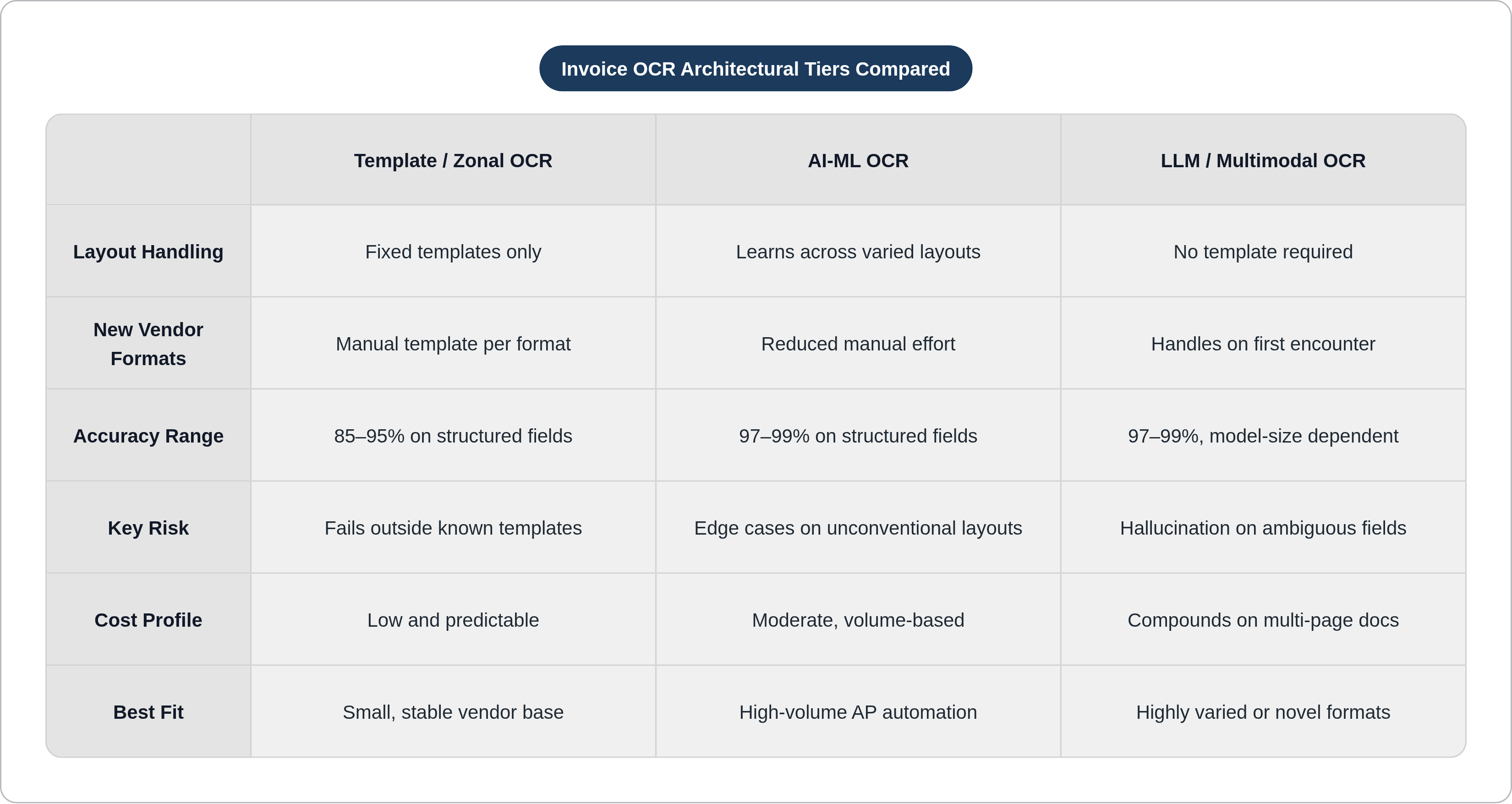
Tier one is traditional or zonal OCR: fixed-zone template capture that works reliably on known layouts and fails on anything outside the template. Every new vendor format requires manual template creation, including inspecting the layout, writing rule-based extraction patterns, and maintaining the template as formats evolve. It is cheap, fast, and entirely appropriate for organizations processing invoices from a small, stable vendor base whose formats do not change. If that describes you, the more sophisticated options are probably expensive overcorrection.
Tier two is AI and ML-based OCR, the current workhorse for high-volume AP automation. These systems learn patterns across layouts, improve from corrections, and handle layout variation without full template dependence. Meaningfully more capable than zonal OCR on varied input; more expensive; still imperfect on unconventional structures.
Tier three is LLM and multimodal approaches: no template required, capable of handling varied layouts on first encounter, and able to reason contextually about ambiguous fields. The trade-offs are real. Token-based pricing compounds on multi-page documents, making cost at scale a serious consideration. And LLM-based extraction introduces hallucination risk, where a confident-looking field value has no actual basis in the document. Hallucination in LLM outputs is well-documented in the research literature; Huang et al.'s "A Survey on Hallucination in Large Language Models" (arXiv:2311.05232, 2023) covers the landscape. You could say the system is very good at making things up — which is a fine quality in a novelist and a disqualifying one in an accounts payable system.
An emerging hybrid architecture attempts to thread this needle by using traditional or AI-based OCR for structured extraction at scale and routing edge cases to LLM handling. It is a sensible design if implemented carefully. It also means you have two systems to monitor instead of one, which is either reassuring or exhausting depending on your staffing situation.
An organization processing thousands of invoices monthly from a small, stable vendor base has distinctly different needs than one handling hundreds of vendor formats with frequent layout changes. The tier framing is not academic. It is the first question worth settling before any vendor conversation begins.
Where Accuracy Stands Across Field Types and Document Quality Levels
The headline range: traditional OCR sits at eighty-five to ninety-five percent on structured invoice fields; AI-ML and LLM-based systems reach ninety-seven to ninety-nine percent. That is a meaningful difference. It is also a compressed summary that obscures important variation within the range, which is where things get interesting.
Field-level performance is not uniform. Invoice totals and vendor names consistently achieve extraction accuracy above ninety-nine percent on well-prepared documents. These fields are simple, spatially unique, and high-contrast. Line items and multi-row tax breakdowns fall to the ninety-five to ninety-seven percent range even on the best systems, because structural complexity degrades performance. Multi-page continuation tables sit at the lowest accuracy tier across all system types, and I have never encountered a production environment where that ceiling was not a recurring problem.
Independent benchmark work from AIMultiple in December 2024 corroborates what practitioners discover on their own: strong performance across tools on high-quality images, with accuracy declining significantly on lower-quality documents. That benchmark also found that Claude Sonnet 3.5 showed the highest resilience across the quality spectrum, which suggests that model architecture choices matter not just for average performance but for performance under adverse conditions. Peer-reviewed work comparing open-source OCR engines found that the highest performer reached ninety-two percent accuracy on English text, with no single engine excelling across all document types and languages (Hegghammer, "OCR with Tesseract, Amazon Textract, and Google Document AI," Political Science Research and Methods, 2022).
But what exactly does "when it works well" mean, and how often does production actually qualify? That question deserves more scrutiny than it usually receives.
Why Vendor Accuracy Claims Often Don't Survive Contact with Production Documents
Most published vendor benchmarks are tested against curated, high-quality document sets. The mobile phone photos taken at odd angles, the faded faxes from suppliers who last updated their equipment in 2009, the multi-generation scans that populate a real AP queue on a real Tuesday: those are absent. This is not necessarily dishonest. It is the natural result of vendors wanting to present their systems in favorable conditions. The gap between the number in the sales deck and the number in the production log is real, and in my experience it is rarely small.
That raises an important question: which accuracy metric is actually being reported?
Field accuracy, document accuracy, and straight-through processing rate are not interchangeable. A system claiming ninety-nine percent field accuracy will still route the majority of invoices to the exception queue if errors concentrate on critical fields, because a document with one wrong line item total fails downstream matching regardless of how accurately vendor name was captured. Straight-through processing rate, the percentage of invoices that complete the workflow without human intervention, is the operationally meaningful metric. The sixty to eighty percent STP range cited here is consistent with figures reported in Ardent Partners' annual AP Metrics That Matter report. If you were expecting "fully automated," that range is a sobering place to start.
LLM-based systems introduce a specific complication. A 2025 arXiv benchmark found that a smaller LLM model scored below fifty percent on a clean invoices dataset. Model size creates a capability threshold, and smaller, cheaper options do not clear it. The practical implication: the cost savings fail to materialize, because the cheaper model performs significantly worse on the documents that matter most.
Ask vendors for STP rates on documents resembling your actual input mix. That request, and the response it generates, will tell you more than any accuracy percentage on a controlled benchmark.
Line Item Extraction Is Where Most Systems Show Their Limits
It is worth being specific about why line item extraction is structurally harder than extracting a vendor name. Invoice transaction tables often lack horizontal or vertical lines. Without visible delimiters, the OCR system must infer column relationships from spatial positioning alone. On a well-formatted digital invoice from a major ERP system, this works reliably. On a table from a small supplier who built their invoice template in a word processor in 2015 and has been adding rows and columns ever since, the spatial inference breaks down in ways that are often difficult to predict in advance.
What goes wrong in practice: columns misalign when cells span multiple rows; hierarchical relationships in nested headers and subtotal rows are lost; SKUs or EAN codes are misclassified when they appear in positions that differ from the training distribution.
One particularly important failure mode is the silent error. The field is populated, but with a value from the wrong row or column. The system returns a result; the result looks plausible; the discrepancy only surfaces downstream during PO matching. In organizations running three-way matching, the error breaks the match and returns the document to human review, negating much of the efficiency gain. In organizations without three-way matching, the error propagates.
That last possibility is worth pausing on. How confident are you that your validation logic would catch a line item value transposed between rows? If the answer is "fairly confident," what is that confidence actually based on?
Image Quality and Document Condition Set a Hard Ceiling on Extraction Accuracy
Preprocessing pipelines improve degraded inputs, but they cannot recover information that was never captured. A scanned document where the ink has faded below a certain threshold will produce uncertain character recognition regardless of how sophisticated the preprocessing layer is. This is not a limitation of any specific platform; it is a physical constraint, and no amount of product marketing changes it.
The practical threshold for reliable extraction on scanned physical invoices is 300 DPI or higher, a figure consistent across OCR vendor documentation and supported by the AIMultiple December 2024 benchmark. Below that, accuracy declines across all tiers. The same benchmark made this concrete: the performance gap between high-quality and low-quality documents was large enough to change vendor rankings. A system that looks superior on clean documents can be inferior on the documents your AP team actually processes.
Handwriting introduces a related but distinct failure mode. Generic OCR achieves roughly ninety-nine percent accuracy on printed text and drops to sixty to seventy percent on handwriting; these figures are consistent with published evaluations of Tesseract and comparable open-source engines. Specialized handwriting recognition services maintain higher accuracy but are absent from many invoice APIs, and when available typically operate as a separate tier with different pricing.
One reasonable argument holds that the solution is simply to enforce electronic submission standards across all suppliers, eliminating physical document capture entirely. That is an excellent idea for a supplier base you have negotiating leverage over. For the long-tail suppliers who still fax invoices and will continue to do so indefinitely, document quality remains the most tractable lever available, which is less satisfying but more accurate.
Layout Variability and Non-Standard Formats That Don't Fit Learned Patterns
No invoice format standard is universally enforced. Different suppliers structure the same information differently, and a single supplier will change formats when they update their accounting software, rebrand, or simply decide their old template needed more columns. This is the fundamental adversarial condition that template-based OCR was never architected to handle at scale.
For template-based systems, the math is unfavorable: every new vendor format requires manual template creation. For organizations processing invoices from dozens or hundreds of vendors, template maintenance scales linearly with vendor count and does not diminish as volumes increase. The engineering cost is real, persistent, and largely invisible in vendor ROI calculations.
AI-ML systems reduce this burden meaningfully but do not eliminate it. They generalize across layouts better than zonal OCR, but unconventional structures, including missing standard fields, non-Western reading order, and embedded sub-items, still cause detection failures. This is observable in benchmark testing, not merely theoretical.
Multi-language documents compound the issue. A single invoice combining Latin-script and non-Latin-script text requires a system with robust multilingual OCR. Not all platforms handle this consistently, and the platforms that claim multilingual support do not always specify which language combinations have been validated or how accuracy varies across them. Before assuming multilingual coverage, ask vendors for documentation specifying validated language pairs. The answers are often more limited than the marketing implies.
The practical implication: before deployment, map your actual vendor base. How many unique invoice formats? How frequently do they change? What languages appear? Then test the API against that specific mix, using your actual documents. The documents vendors use for demonstrations are not randomly sampled from the population of documents you will actually process.
Extraction Without Validation: The Gap Between Reading a Document and Understanding It
This is the distinction that gets elided most frequently in vendor conversations, and it is the most consequential one.
OCR extracts what is on the page. It does not verify whether what is on the page is correct, internally consistent, or compliant with tax rules. A total field extracted as twelve thousand three hundred dollars is exactly what appears on the invoice; if the corresponding purchase order was for one thousand two hundred and thirty dollars, only downstream matching logic catches the discrepancy. The OCR system performed correctly. The process failed. These are different things.
LLM-based systems introduce a specific version of this problem. Hallucination, the generation of a plausible-looking field value with no basis in the actual document, occurs most frequently when fields are missing or ambiguous, precisely the conditions under which the system is most likely to be consulted in lieu of human review. Rule-based systems do not hallucinate. That is one of their genuine advantages over LLM-based approaches, and it is underweighted in most evaluations.
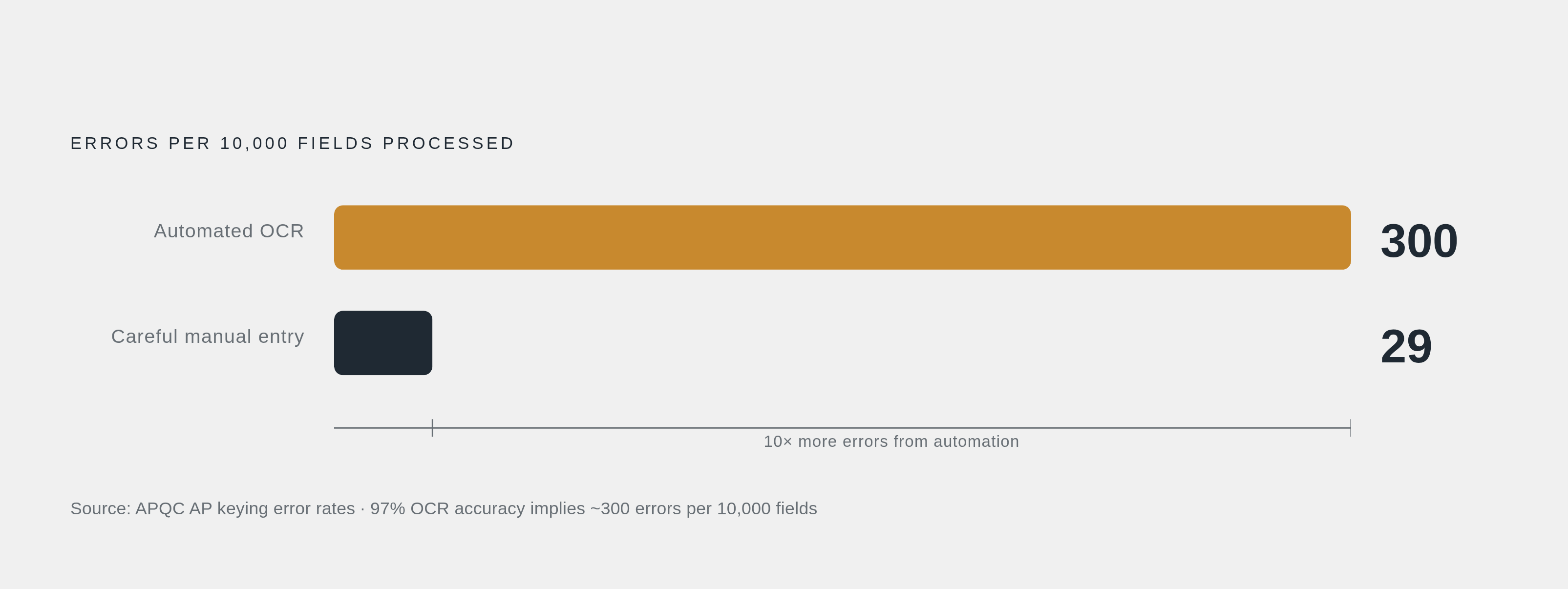
It is also worth considering error rates in absolute terms. A system achieving ninety-seven percent automated accuracy produces roughly three hundred errors per ten thousand fields processed. Careful manual entry generates approximately twenty-nine errors per ten thousand fields, a figure drawn from APQC data on AP keying error rates. The automated system's error rate is therefore an order of magnitude higher, concentrated on the fields that matter most. The cost and speed advantages of automation are real. But they coexist with a higher error rate, which means validation logic is not optional infrastructure. It is the mechanism that makes the speed advantage operationally trustworthy rather than operationally risky.
Extraction accuracy and process accuracy are different things. A highly accurate OCR API without downstream validation is like a very fast courier who delivers packages to the wrong address with complete confidence — impressive speed, real consequences.
Model Drift and the Maintenance Reality After Deployment
The assumption that an OCR system improves with volume over time is broadly accurate for homogeneous, high-volume document flows. It is considerably less accurate for organizations with continuously heterogeneous document mixes, frequent new vendor formats, and a long tail of one-off invoice types. The feedback loop that enables learning requires enough repeated examples to generalize from. Rare document types do not provide that volume, and in most real AP operations, the long tail is longer than anyone expects.
Accuracy degradation after deployment is a known pattern. Supplier formats change; new vendors are introduced; exception-handling corrections are not consistently fed back into the model. The system that achieved a strong STP rate in the first three months will perform measurably worse a year later, particularly on vendor formats that have evolved since initial training.
Most platforms do not trigger automatic notifications when accuracy on a specific document type begins declining. Detection requires active monitoring. Passive operation, absent instrumented accuracy tracking, means degradation accumulates until a downstream process failure makes it visible. By then, the discrepancies have usually been propagating for longer than anyone is comfortable admitting.
Legacy ERP integration creates a parallel maintenance burden. Older systems may lack modern API connectors, requiring custom export formats or middleware. This integration complexity does not appear in vendor accuracy claims but directly affects end-to-end reliability, and it compounds over time as both the ERP and the OCR platform evolve independently.
How to Evaluate an Invoice OCR API Against the Constraints That Will Actually Affect Your Deployment
There is a version of this evaluation that looks like due diligence but is not. Running a vendor's sample documents through their own demo environment and accepting the reported accuracy as representative is that version. Here is the other version.
Start with your document mix. Catalog the formats, languages, input channels, and vendor count you actually process. Test the API against those documents. The delta between vendor-demo performance and production performance is almost always attributable to the gap between the test documents and the real ones.
Ask for STP rates, not field accuracy. A vendor reporting ninety-nine percent field accuracy will still route a substantial portion of invoices to exception queues if errors concentrate on critical fields. STP rate on documents similar to yours is the number that maps to operational cost.
Test specifically on your weak spots. If line items matter because you run three-way matching, test on complex multi-row tables. If physical document capture is part of your process, test at realistic scan quality. If you have a multilingual vendor base, test on actual language combinations, not the ones the vendor volunteers.
Understand the tier you are buying and what you are trading away. Template-based systems require upfront format investment and ongoing maintenance. AI-ML systems reduce that burden but have layout edge cases. LLM systems handle variability best but carry cost and hallucination risk that require active mitigation, not assumptions.
Build validation into the workflow as a primary design decision. PO matching, tax rule validation, and anomaly flagging need to exist alongside extraction, not downstream of it as an afterthought. They are not a substitute for rigorous OCR evaluation; they are what makes an accurate OCR system operationally trustworthy.
Plan for accuracy monitoring from day one. Define what degradation looks like. Track per-vendor or per-format accuracy over time. Establish thresholds that trigger human review or model retraining. An AP team member looking at an invoice that generated three different totals across three pages would catch it, because humans are reasonably good at noticing when something feels wrong before they can say exactly why. The question worth sitting with, before committing to any invoice OCR API at production scale, is whether your deployed configuration would catch it too, or whether it would extract one total with complete confidence and leave the discrepancy for someone else to find later.
The distinction between those two outcomes is not primarily a function of which API you chose. It is a function of how you deployed it.