CRM and Property Data Sync Tools for Commercial Real Estate Teams
Match each tool's sync design to the data your team actually moves.

CRM and property data sync tools for commercial real estate teams deliver value when they close a specific workflow gap. The useful comparison begins with three questions. What data needs to move, between which systems, and how often? For brokers, the answer may be ownership records linked to outreach. For lenders, it extends to financial documents linked to loan and portfolio decisions.
Why most CRE teams struggle with property data sync before they ever evaluate a tool
A contact sits in an inbox, a property record lives in a listing folder, and the deal’s latest stage appears in a spreadsheet. Someone must reconcile them before the team can act. Often, that responsibility falls to one person, and the updates happen infrequently. This disconnect between relationships, properties, and deals can slow transactions and leave opportunities unnoticed.
A residential transaction centers on a buyer, a seller, and a closing, while a commercial transaction can involve investors, tenants, landlords, brokers on both sides, lenders, attorneys, and property managers. Their timelines do not conveniently line up. A CRM must track those relationships simultaneously and preserve their connection to the same property and transaction. A current contact record is of limited use if the associated deal stage is stale.
Most CRE professionals still coordinate this work across spreadsheets, inboxes, and separate folders. In that setting, “sync” means keeping related records connected as the work changes, rather than merely copying information between applications. Software can close the gap, but only if its connections match the process. Otherwise, the spreadsheet remains the unofficial control room, now with another subscription to supervise.
What data actually needs to move, and between which systems
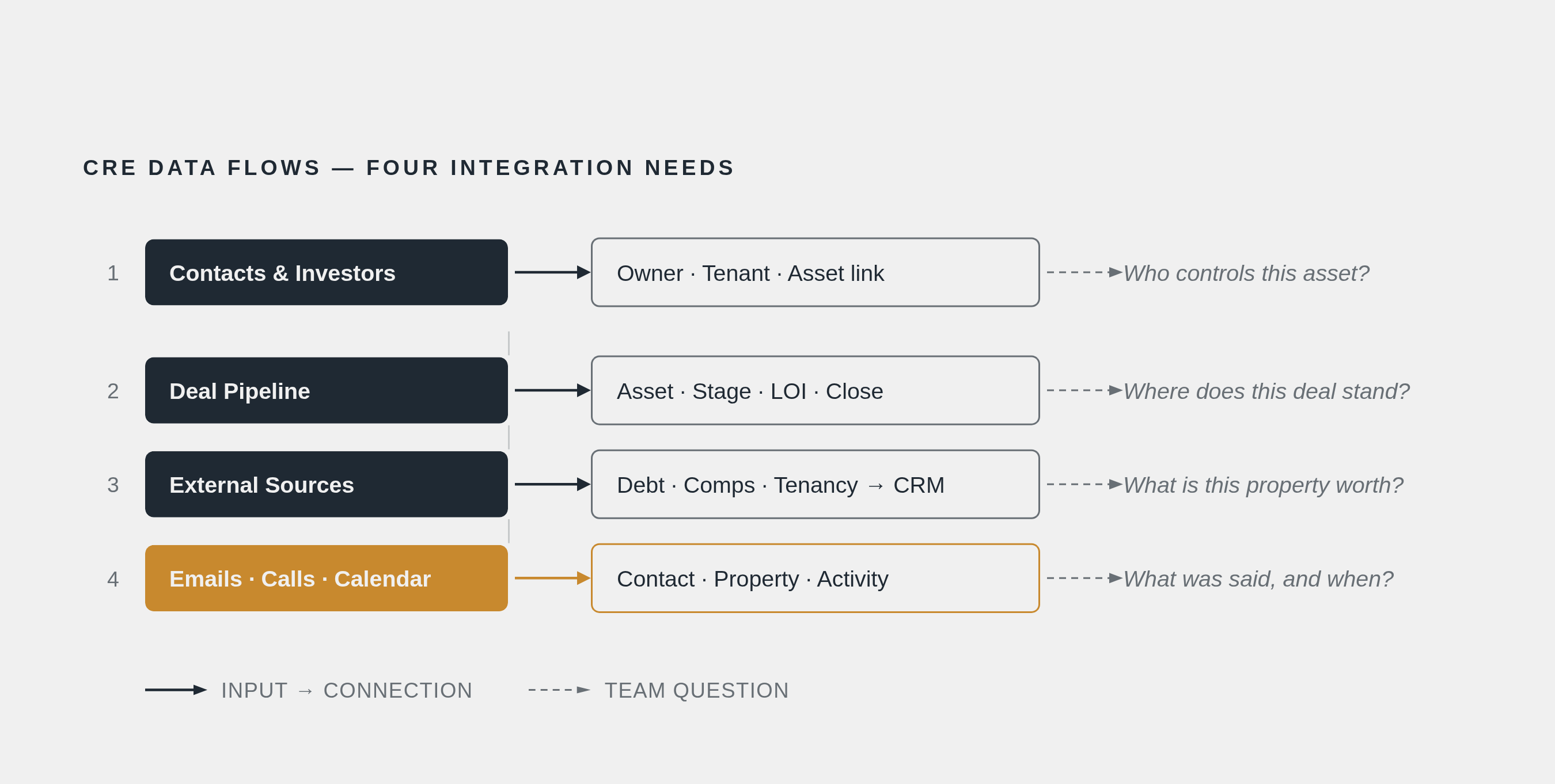
The first distinction is between linking records already inside a team’s systems and bringing outside data into those records. They are different integration needs. Contact-to-property linkage binds owners, tenants, and investors to specific assets, so a broker opening a contact can see every property that person touches. Those relationships must either exist in the record or be reconstructed from emails and memory.
Deal pipeline-to-property sync links the asset to its transaction history and deal stage. It answers a different question from contact linkage. What is live, under LOI, or closed on this property? A team can have complete ownership information and still lack a dependable view of its own transactions. Here, the relevant connection is between the deal pipeline and the property record, rather than between an external database and the CRM.
Property data-to-financial sync brings in data from that external source. Ownership history, debt records, sale and lease comps, and tenancy move into the CRM so prospecting and underwriting can work from the same record. This is more than a better address book. A team that needs ownership and debt information in a deal model needs more than simple contact-to-property linkage.
Activity logging completes the picture by connecting email, calls, and calendar events to the right contact and property. Its purpose is to remove after-the-fact manual entry. Taken together, these flows reveal where an operation depends on someone transferring or interpreting information by hand. “The CRM needs better data” is less revealing than identifying which property information is missing from which deal record.
How sync cadence — real-time, daily, or on-demand — changes what a tool must do
Timing is part of the requirement, too. A tool may link the right records but update them too slowly for the decision the team needs to make. If a broker needs current ownership or financial information before a call, a weekly update still leaves a manual check between the software and the work.
Real-time or near-real-time updates serve workflows in which ownership changes, new debt placements, or lease expirations trigger outreach. The information must be current when the broker picks up the phone. ClientLook’s integration with LightBox’s LightBox Vision, formerly LandVision, illustrates this design choice through real-time updates on ownership, sales history, and financial data. That cadence addresses the needs of outbound prospecting. It is not evidence that every other workflow needs the same refresh rate.
Daily or batch updates can work for pipeline reporting, activity logging, and comp tracking when yesterday’s information is enough to make today’s decision. On-demand retrieval serves a different pattern. It can work when a team researches individual properties only as needed, but manual initiation becomes a constraint at scale. Selection therefore depends on whether a delay changes the action the team needs to take.
The six CRE CRM platforms and what their sync architectures actually do
A six-platform comparison here spans Buildout Rethink, ClientLook, Dealpath, RealNex Navigator, Salesforce, and HubSpot. They do not represent six interchangeable architectures. The platforms differ in which data flows they handle natively, which need integrations, and which need configuration. The first four frame the CRE-specific choices, while the two general-purpose systems raise a separate implementation question.
Buildout Rethink has a list-price monthly fee per user, with value-based discounts for teams. That pricing structure describes the purchase. The available detail does not establish its refresh cadence or how each of the four data flows is connected. A factual comparison must leave those distinctions open rather than infer an architecture from the product’s CRE positioning.
ClientLook by LightBox provides a more specific external-data example through the LightBox Vision integration described above. Its relevance is the connection between property intelligence and the broker’s working records. Pricing is available on request, with a lower rate billed annually and a 10-day trial. Neither the trial nor the billing model substitutes for matching that scope to the team’s actual data needs.
Dealpath is built for institutional investment teams that manage deals from early qualification through close. It centralizes property, deal, and asset data, including deal stage tracking. Its emphasis is execution depth. Owner-data and comp prospecting are not core use cases, so it addresses a different operational gap from an outbound brokerage workflow.
Dealpath also offers a map view of projects and an MCP server integration for AI tooling on the Enterprise tier. Dealpath’s official support page states that its Outlook add-in requires an existing Dealpath enterprise account and works on Windows, Mac, and web. Access conditions therefore belong in the comparison. There is typically a 5-user minimum, with pricing unpublished and no free trial listed.
RealNex’s official product page states that NavigatorPRO includes a custom version of Navigator with RX Data. That dataset has details on land and buildings, ownership, loan profiles, and transaction history. RealNex’s official press release also describes tenant information within RX Data’s nationwide coverage. The supplied product detail does not specify pricing or refresh cadence, so neither can be assumed from the breadth of the dataset.
Salesforce and HubSpot complete the comparison through a different route, using general-purpose CRM foundations out of the box. Their potential coverage depends on what is built or connected. That makes their configuration requirements central to the evaluation, rather than a small implementation footnote after the purchase.
What general-purpose CRMs (Salesforce, HubSpot) can and cannot do without CRE configuration
Salesforce and HubSpot often enter the shortlist because a team already uses them. Familiarity is a legitimate starting point. It does not, however, mean that the system already represents the relationships among owners, tenants, investors, properties, and transactions. Neither platform provides CRE-specific data models out of the box, so the gaps that CRE-native tools close by default must be built or bought separately.
Salesforce has tiered pricing that starts at a low rate per user each month on Starter Suite, along with a 30-day trial. HubSpot has a free tier and paid plans priced per seat/month. The implementation cost also includes the ongoing work needed to reach the required CRE sync outcome.
The tradeoff is not breadth versus inferiority. A general-purpose CRM with the right integrations can match a CRE-native tool’s sync coverage, but creating that equivalence requires investment. For a team evaluating an existing system, the lesson is to compare the cost of closing its specific gaps with the cost of adopting a platform where those connections are already part of the design.
Where the CRM layer stops and the financial document layer begins — and why that boundary matters for lenders
For lenders, debt funds, and asset managers, contact-to-property linkage is not the central financial data problem. The critical connection runs from borrower documents to loan and portfolio records. Operating statements, rent rolls, tax returns, and appraisals arrive as unstructured documents that must be extracted, spread, and connected to the loan.
The distinction becomes sharper after origination, when DSCR, LTV, and debt yield must be tested against loan agreement terms on a continuous basis. Portfolio records also need current financials across every asset. A CRM does not read a T-12. Nor does syncing its contact and property records test a DSCR covenant. Those functions belong to a separate document intelligence and financial spreading layer, and treating CRM sync as sufficient leaves room for covenant breaches and concentration risks to accumulate between the recorded status and the underlying financial evidence.
What purpose-built document intelligence adds for lenders managing property-level financial data
For lenders, sync needs to link submitted financial documents to the portfolio intelligence an asset manager uses. That requires more than moving a file. A document-aware platform must read and structure unstructured CRE financial information at the asset level, then support its use in ongoing monitoring. The loan record needs to show what the latest document means for the loan’s finances.
Automated financial spreading closes the first part of that gap. It extracts financial information from operating statements and rent rolls, supports measures including DSCR, LTV, and debt yield, and connects the resulting figures to the loan record with a citation back to the source page. The source connection is essential to the function. It ties the financial output to the document so the spread does not become another separate record that someone must reconcile.
Covenant monitoring uses those current financials against the terms of the loan agreement. Its role extends beyond origination. Continuous testing aims to flag a breach before it becomes a technical default, without waiting for a quarterly review to find it. The relevant update is not simply a refreshed contact or ownership field, but a new financial position tested against the obligations governing the loan.
Credit memo generation addresses a related handoff by producing a structured underwriting narrative from the same extracted data. That shared basis removes a source of reconciliation errors between the spread and the memo. Portfolio-level pattern detection then changes the scale of analysis. It can surface concentrations by sector, geography, sponsor, or supply chain that remain invisible in loan-by-loan review.
A firm’s add-back rules, templates, and concentration limits shape how extracted information becomes an underwriting or monitoring result. A platform built for CRE lending uses that context to work with the information it extracts. Otherwise, someone still has to reconcile the output by hand before making a decision.
The lender’s evaluation therefore follows the same diagnostic logic as the broker’s, but across a different boundary. Which financial documents must become usable data, which loan and portfolio records need that data, and when must the change trigger review? The right tool closes that specific connection.